4. Script
Introduction || 1. Getting started || 2. Generator || 3. Simulator || 4. Script || 5. Next steps
Now lets write the script that configures our generator and simulator functions and starts libEnsemble.
Create an empty Python file named calling.py.
In this file, we’ll start by importing NumPy, libEnsemble’s setup classes, the generator,
and simulator function.
In a class called LibeSpecs we’ll
specify the number of workers and the manager/worker intercommunication method.
"local", refers to Python’s multiprocessing.
 1import numpy as np
 2from gest_api.vocs import VOCS
 3from sine_gen_std import RandomSample
 4from sine_sim import sim_find_sine
 5
 6from libensemble import Ensemble
 7from libensemble.specs import ExitCriteria, GenSpecs, LibeSpecs, SimSpecs
 8
 9if __name__ == "__main__":  # Python-quirk required on macOS and windows
10    libE_specs = LibeSpecs(nworkers=4, comms="local")
We configure the settings and specifications for our sim_f and gen_f
functions in the GenSpecs and
SimSpecs classes, which we saw previously
being passed to our functions as dictionaries.
These classes also describe to libEnsemble what inputs and outputs from those
functions to expect.
10    gen_specs = GenSpecs(
11        generator=generator,  # Pass our generator and config to libEnsemble
12        vocs=vocs,
13        batch_size=4,
14    )
15
16    sim_specs = SimSpecs(
17        sim_f=sim_find_sine,  # Our simulator function
18        inputs=["x"],  # InputArray field names. "x" from gen_f output
19        out=[("y", float)],  # sim_f output. "y" = sine("x")
20    )  # sim_specs_end_tag
We then specify the circumstances where libEnsemble should stop execution in ExitCriteria.
26 exit_criteria = ExitCriteria(sim_max=80) # Stop libEnsemble after 80 simulations
Now we’re ready to write our libEnsemble libE
function call. ensemble.H is the final version of
the history array. ensemble.flag should be zero if no errors occur.
28    ensemble = Ensemble(sim_specs, gen_specs, exit_criteria, libE_specs)
29    ensemble.run()  # start the ensemble. Blocks until completion.
30
31    history = ensemble.H  # start visualizing our results
32
33    print([i for i in history.dtype.fields])  # (optional) to visualize our history array
34    print(history)
That’s it! Now that these files are complete, we can run our simulation.
python calling.py
If everything ran perfectly and you included the above print statements, you should get something similar to the following output (although the columns might be rearranged).
["y", "sim_started_time", "gen_worker", "sim_worker", "sim_started", "sim_ended", "x", "allocated", "sim_id", "gen_ended_time"]
[(-0.37466051, 1.559+09, 2, 2,  True,  True, [-0.38403059],  True,  0, 1.559+09)
(-0.29279634, 1.559+09, 2, 3,  True,  True, [-2.84444261],  True,  1, 1.559+09)
( 0.29358492, 1.559+09, 2, 4,  True,  True, [ 0.29797487],  True,  2, 1.559+09)
(-0.3783986, 1.559+09, 2, 1,  True,  True, [-0.38806564],  True,  3, 1.559+09)
(-0.45982062, 1.559+09, 2, 2,  True,  True, [-0.47779319],  True,  4, 1.559+09)
...
In this arrangement, our output values are listed on the far left with the generated values being the fourth column from the right.
Two additional log files should also have been created.
ensemble.log contains debugging or informational logging output from
libEnsemble, while libE_stats.txt contains a quick summary of all
calculations performed.
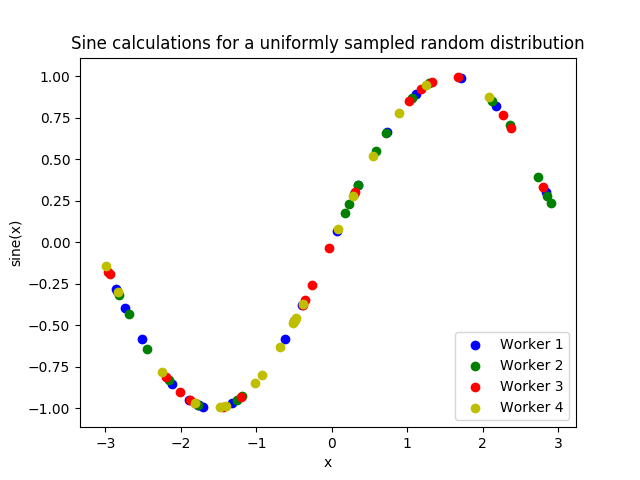
Here is graphed output using Matplotlib, with entries colored by which
worker performed the simulation:
If you want to verify your results through plotting and installed Matplotlib
earlier, copy and paste the following code into the bottom of your calling
script and run python calling.py again
37    import matplotlib.pyplot as plt
38
39    colors = ["b", "g", "r", "y", "m", "c", "k", "w"]
40
41    for i in range(1, libE_specs.nworkers + 1):  # type: ignore
42        worker_xy = np.extract(history["sim_worker"] == i, history)
43        x = [entry.tolist() for entry in worker_xy["x"]]
44        y = [entry for entry in worker_xy["y"]]
45        plt.scatter(x, y, label="Worker {}".format(i), c=colors[i - 1])
46
47    plt.title("Sine calculations for a uniformly sampled random distribution")
48    plt.xlabel("x")
49    plt.ylabel("sine(x)")
50    plt.legend(loc="lower right")
51    plt.savefig("tutorial_sines.png")
Each of these example files can be found in the repository in examples/tutorials/simple_sine.
Exercise
Write a Calling Script with the following specifications:
Set the generator function’s lower and upper bounds to -6 and 6, respectively
Increase the generator batch size to 10
Set libEnsemble to stop execution after 160 generations using the
gen_maxoptionPrint an error message if any errors occurred while libEnsemble was running
Click Here for Solution
 1import numpy as np
 2from sine_gen import gen_random_sample
 3from sine_sim import sim_find_sine
 4
 5from libensemble import Ensemble
 6from libensemble.alloc_funcs.give_sim_work_first import give_sim_work_first
 7from libensemble.specs import AllocSpecs, ExitCriteria, GenSpecs, LibeSpecs, SimSpecs
 8
 9if __name__ == "__main__":
10    libE_specs = LibeSpecs(nworkers=4, comms="local")
11
12    gen_specs = GenSpecs(
13        gen_f=gen_random_sample,  # Our generator function
14        out=[("x", float, (1,))],  # gen_f output (name, type, size)
15        batch_size=10,  # number of x's gen_f generates per call
16        user={
17            "lower": np.array([-6]),  # lower boundary for random sampling
18            "upper": np.array([6]),  # upper boundary for random sampling
19        },
20    )
21
22    sim_specs = SimSpecs(
23        sim_f=sim_find_sine,  # Our simulator function
24        inputs=["x"],  # InputArray field names. "x" from gen_f output
25        out=[("y", float)],  # sim_f output. "y" = sine("x")
26    )
27
28    alloc_specs = AllocSpecs(alloc_f=give_sim_work_first)
29
30    exit_criteria = ExitCriteria(gen_max=160)
31
32    ensemble = Ensemble(sim_specs, gen_specs, exit_criteria, libE_specs, alloc_specs)
33    ensemble.run()
34
35    if ensemble.flag != 0:
36        print("Oh no! An error occurred!")